



Gen AI India

AI Copilot Solutions

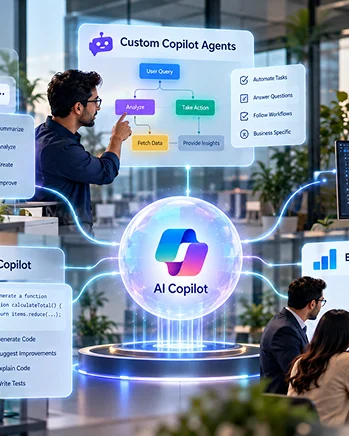
Your enterprise already has the people, processes, and systems to drive growth. We help you connect them with AI Copilot solutions that integrate across Microsoft 365, automating repetitive work, surfacing actionable insights, and enabling employees to make faster, informed decisions with AI grounded in your business context.

  • Microsoft 365 Copilot Implementation
  • Custom Copilot Agent Development
  • Copilot Business System Integration
  • Copilot Adoption and Training
Get a Free AI Copilot Assessment

Trusted by Reputed Brands

Client Logo
Client Logo
Client Logo
Client Logo
Client Logo
Client Logo
Client Logo
Client Logo
Client Logo
Client Logo
Client Logo
Client Logo

0+

Years in technology delivery

0+

AI/ML engineers

0+

AI projects delivered

0

Countries/markets served

Which AI Copilot Solution Fits the Enterprise?

Every organization has different AI priorities, workflows, and technology requirements. Choose the Copilot approach that aligns with your users, business processes, existing systems, and automation goals.

Developer reviewing AI code and a neural network visualization on a laptop screen
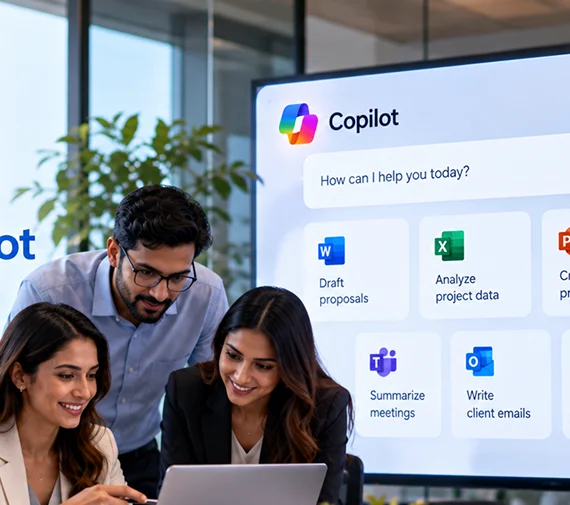
  • Microsoft 365 Copilot

    For employees who need AI assistance across Word, Excel, PowerPoint, Outlook, Teams, and other Microsoft 365 applications.

  • Custom Copilot Agents

    For organizations that need AI to perform specific business tasks, answer specialized questions, or follow defined workflows.

  • Copilot + Business Systems

    For teams that need AI to work across CRM, ERP, HR, service management, databases, and other enterprise systems.

  • GitHub Copilot

    For development teams looking to incorporate AI assistance into coding, testing, documentation, and software development workflows.

  • Enterprise Copilot Transformation

    For organizations requiring readiness assessment, governance, implementation, adoption, custom agents, integrations, and continuous optimization.

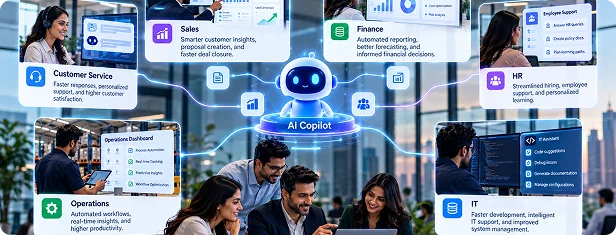
Where Can AI Copilot Create Business Impact?

AI Copilot is a layer of intelligence that can be applied across every function in your business, from customer service and sales through to finance, HR, operations, and IT.

Draft, Summaries, and Communicate Faster

AI Copilot creates first drafts for emails, documents, presentations, and meeting notes using your business context and terminology. Employees review, refine, and approve output while retaining control.

Turn Meetings into Instant Action

Copilot turns meetings into structured summaries, decisions, and action items. Instead of losing valuable context in scattered notes, teams receive clear follow-ups they can share and act immediately.

Surface Data Without Querying It

Employees can ask business questions in plain English and receive answers grounded in connected data sources, Microsoft 365, or custom knowledge bases, without waiting for manually prepared reports.

Automate Repetitive Workflows

Custom Copilot agents can automate repetitive workflows such as invoice processing, purchase approvals, employee onboarding, customer routing, and compliance checks, handling notifications, documentation, escalation, and routine decisions automatically.

User-Ready Assistant

Copilot gives sales, service, and account teams instant access to customer history, product details, pricing, and open issues, reducing manual searches and helping employees respond with complete context.

Accelerate Developer & Technical Workflows

GitHub Copilot and Azure AI-assisted development help technical teams generate code, documentation, tests, and review suggestions faster. Developers retain control over architecture, problem-solving, security, and final implementation decisions.

Enterprise AI Copilot Solutions Built Around Businesses

No two organizations use AI in the same way. Our Copilot solutions combine Microsoft technologies, business data, workflows, and governance requirements to create an AI environment built around your operational needs.

  1. Our Gen AI development company implements Microsoft 365 Copilot across your existing workplace environment, preparing data, permissions, governance, users, and workflows so teams can adopt AI safely and consistently.

    What we deliver

    • Copilot readiness assessment and Microsoft 365 data governance review
    • SharePoint and OneDrive content organization and permission optimization
    • Sensitivity labels and data access control configuration
    • Persona-based rollout, employee training, and adoption tracking
  2. We build specialized Copilot agents that connect your business workflows, knowledge, and systems, helping employees automate focused tasks and access relevant information without switching between applications.

    What we deliver

    • Business process analysis and high-value agent use-case identification
    • Custom agent design, development, testing, and deployment
    • Microsoft 365, Dynamics 365, SharePoint, and third-party integrations
    • Multi-channel deployment with ongoing performance monitoring and optimization
  3. We assess your Microsoft 365 environment for data risks, permission gaps, sensitive content, and outdated information, then establish governance practices that support secure and reliable Copilot adoption.

    What we deliver

    • Microsoft 365 data audit and oversharing risk assessment
    • Sensitivity label taxonomy and implementation
    • SharePoint and OneDrive permission review and remediation
    • Microsoft Purview governance, AI policies, and compliance monitoring
  4. Our Gen AI integration services configure Copilot around the workflows and priorities of individual departments, helping finance, sales, HR, customer service, IT, and operations apply AI to their daily business tasks.

    What we deliver

    • Reporting, variance analysis, invoice support, and FP&A workflows
    • Account research, proposals, meeting preparation, and CRM updates
    • Policy queries, onboarding, job descriptions, and employee communication
    • Case summaries, knowledge search, incident documentation, and support
  5. We help development teams adopt GitHub Copilot for code generation, testing, documentation, and reviews while establishing governance, security controls, and developer practices that protect software quality.

    What we deliver

    • GitHub Copilot configuration and security policy setup
    • Code quality and security scanning integration
    • Developer onboarding and role-based training
    • Usage analytics, productivity measurement, and ongoing support
  6. We help employees move from simply having Copilot access to using it effectively through role-based training, leadership support, internal champions, practical workflows, and continuous adoption measurement.

    What we deliver

    • Executive briefings and leadership enablement sessions
    • Role-specific Copilot training based on employee workflows
    • Internal Copilot champions programmed development
    • Adoption analytics, feedback collection, and continuous user support

Build AI Copilots Around the Way Your Business Works

From Microsoft 365 Copilot implementation to custom Copilot Studio agents, we design solutions around your workflows, data, and business systems.

Where AI Copilot Fits Across the Microsoft Enterprise Ecosystem

AI Copilot works across the Microsoft applications your teams already use, bringing AI assistance closer to everyday tasks. From documents and meetings to data and workflows, it connects productivity with business context.

Microsoft Word

Copilot drafts documents from prompts, summarizes lengthy reports, rewrites content for different audiences, and extracts important information from files, helping employees transform ideas and complex documents into useful content.

Microsoft Excel

Copilot analyses spreadsheet data, identifies trends, generates formulas from natural-language instructions, creates charts, and answers data questions, helping users understand business information without manually building complex calculations or queries.

Microsoft PowerPoint

Copilot creates presentation outlines, builds slides from documents, converts meeting notes into decks, suggests speaker notes, and improves layouts, helping teams develop consistent, professional presentations without starting from scratch.

Microsoft Outlook

Copilot summarizes lengthy email conversations, drafts context-aware replies, highlights important messages, prepares meeting briefings, and helps manage communication, allowing employees to spend less time processing inboxes and more time responding.

Microsoft Teams

Copilot summarizes meetings and conversations, captures decisions and action items, answers questions about discussions, and helps users catch up on missed chats, giving distributed teams a clearer context without reviewing everything.

Microsoft Viva

Copilot helps employees discover relevant knowledge, summaries internal communications, prepare for meetings, and access personalized learning recommendations, connecting people with organizational expertise while supporting managers and improving everyday employee experiences.

SharePoint and OneDrive

Copilot helps employees search for organizational content using natural-language questions, summaries of documents and libraries, and surface relevant information from SharePoint and OneDrive, reducing time spent manually searching across scattered files.

Dynamics 365

Copilot supports sales, service, and finance teams with account summaries, opportunity preparation, proposal drafting, case insights, knowledge retrieval, transaction queries, and report generation, helping employees make decisions using relevant business information.

Copilot Studio

Copilot Studio enables organizations to build custom AI agents for specific workflows, connect external systems, automate business processes, and deploy purpose-built assistants across Teams, websites, SharePoint, and other channels.

From Copilot Readiness to Enterprise-Wide AI Adoption

Successful Copilot adoption requires more than deploying licenses. Our structured approach combines readiness, governance, implementation, training, adoption, and optimization to turn AI investment into measurable business value.

1

Phase 1

AI Readiness Assessment

First, we assess your Microsoft 365 environment, licensing, data governance, workflows, and business priorities to identify high-value Copilot opportunities and create a practical roadmap aligned with implementation complexity.

2

Phase 2

Governance and Data Preparation

We strengthen SharePoint, OneDrive, permissions, sensitivity labels, content organization, and Microsoft Purview controls, ensuring Copilot accesses appropriate information while reducing unnecessary exposure across your organization.

3

Phase 3

Pilot Deployment with Targeted User Group

We deploy Copilot to a representative pilot group, measure usage, collect feedback, identify adoption barriers, and use findings to refine training, communications, support, and organization-wide deployment strategies.

4

Phase 4

Organization-Wide Rollout

We execute a phased rollout covering licensing, persona-based training, internal communications, champions programmers, and user support, helping each department adopt Copilot with guidance suited to its responsibilities and workflows.

5

Phase 5

Custom Agent Development

Our Gen AI model development services team identifies workflow automation opportunities and builds custom Copilot agents using Copilot Studio, connecting relevant systems and data sources while incorporating testing, governance, security, and user feedback before deployment.

6

Phase 6

Adoption Measurement and Continuous Improvement

We monitor Copilot adoption and usage patterns, identify underused capabilities, introduce targeted interventions, and expand successful use cases as business requirements and Microsoft capabilities continue developing.

AI Copilot in Action: Enterprise Challenges and Outcomes

Explore how our implementations help organizations improve productivity, automate workflows, strengthen collaboration, and reduce manual effort.

Microsoft 365 collaboration and video meeting scenario representing the professional services case study

Professional Services Firm Microsoft 365 Copilot Adoption

The Challenge

The organization had purchased Microsoft 365 Copilot licenses, but adoption remained limited to a small group of enthusiastic users. Data governance issues also created concerns around safe and effective Copilot deployment.

How We Helped

We assessed the organization's Microsoft 365 environment, identified data governance issues affecting Copilot adoption, and helped remediate the underlying problems. We then delivered a role-focused training programmed to help consultants apply Copilot to their everyday workflows.

The Impact

  • Increased active Copilot usage to 70%+
  • Addressed data governance barriers affecting adoption
  • Helped consultants incorporate Copilot into everyday work
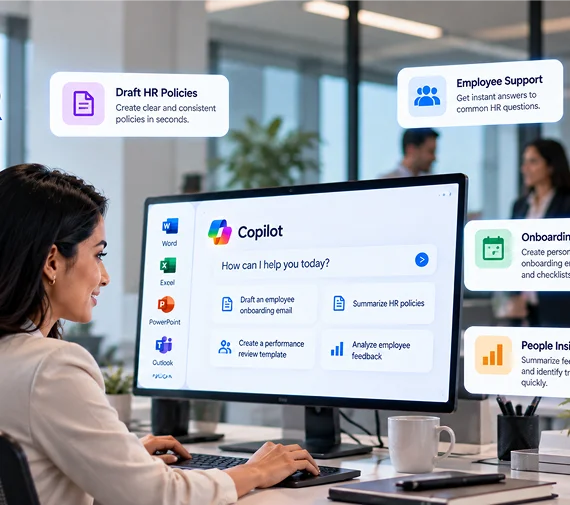
Laptop showing an HR-focused Copilot agent interface in a modern office

Financial Services Organization AI Copilot for HR

The Challenge

The HR team was spending a significant amount of its time responding to routine employee questions about policies and internal processes. Employees also had to wait for HR teams to provide answers to common queries.

How We Helped

We developed a custom HR Copilot agent using Copilot Studio that provides employees with policy-grounded answers to routine questions. The solution was designed to retrieve relevant organizational information and respond without requiring HR intervention for every query.

The Impact

  • Reduced the HR team's routine policy-query workload
  • Automated queries that previously consumed 40% of HR time
  • Delivered policy-grounded answers in under one minute
Healthcare and governance concept representing secure Microsoft 365 Copilot deployment

Healthcare Organization Microsoft 365 Copilot Governance

The Challenge

The organization wanted to deploy Microsoft 365 Copilot at scale but needed confidence that sensitive information was appropriately protected. Existing SharePoint permissions and content-sharing practices required closer examination before deployment.

How We Helped

We conducted a governance-focused audit of the organization's SharePoint environment to identify oversharing risks and permission issues. The findings were used to address data-access concerns before expanding Copilot deployment.

The Impact

  • Identified previously unknown SharePoint oversharing risks
  • Addressed governance issues before large-scale Copilot deployment
  • Created a stronger foundation for controlled AI adoption

Ready to Turn Your Microsoft Investment into Business Value?

Get a practical roadmap covering Copilot readiness, governance, priority use cases, implementation requirements, and opportunities for custom AI agents.

The Microsoft Technology Stack Powering Enterprise Copilot Solutions

Enterprise Copilot implementations often require more than a single Microsoft application. Hire Gen AI developers to work across Microsoft's AI, cloud, data, security, automation, and development ecosystem to build connected solutions.

Microsoft 365 Copilot Copilot Studio GitHub Copilot GitHub Copilot Microsoft Azure Microsoft Copilot for Azure Dynamics 365 Copilot in Dynamics 365
SharePoint SharePoint Online Microsoft Teams Microsoft Teams Exchange Online Exchange Online OneDrive OneDrive for Business Microsoft Viva Microsoft Search Microsoft Loop
Azure Azure OpenAI Service Azure Azure AI Studio Azure Azure Machine Learning Azure Azure AI Search Microsoft Fabric Power BI Power BI
Microsoft Purview Sensitivity Labels Data Loss Prevention Microsoft Entra ID Conditional Access Microsoft Defender for Microsoft 365
Power Automate Power Automate Logic Apps Microsoft Graph API REST API Connectors Azure Functions Azure Functions Azure Service Bus
GitHub Copilot GitHub Copilot Azure DevOps Azure DevOps Visual Studio Code Visual Studio Code GitHub Actions GitHub Actions Kubernetes Azure Kubernetes Service

How Is Microsoft AI Copilot Different from General AI Assistants?

Factor General AI Assistant Enterprise Copilot
Organizational context Limited Microsoft ecosystem context
Microsoft 365 integration Limited Native
Business data User-provided Permission-controlled organizational data
Governance Depends on platform Enterprise Microsoft controls
Workflow automation Varies Copilot Studio + Power Platform
Identity Often separate Microsoft Entra ecosystem
Enterprise deployment Varies Designed for organizational environments

Industries We Serve

AI adoption looks different across industries because workflows, regulations, data environments, and business priorities vary. We tailor Copilot implementations around the operational and compliance requirements of each sector.

Financial services professional using a smartphone with finance-themed icons

Financial Services and Banking

Document generation for client reporting, regulatory filing support, meeting preparation for relationship managers, policy query automation for compliance and HR teams, and audit trail documentation.

Legal and professional services icons representing matter documentation

Professional Services and Legal

Matter documentation, client deliverable drafting, research summarization, timesheet narrative generation, proposal development, and internal knowledge management.

Healthcare and life sciences icons representing clinical documentation

Healthcare and Life Sciences

Clinical documentation support, administrative workflow automation, patient communication drafting, regulatory submission support, and research summarization implemented with privacy controls.

Manufacturing and engineering icons representing technical documentation

Manufacturing and Engineering

Technical documentation generation, maintenance runbook creation, supply chain query handling, production reporting, and field engineer support connecting Copilot to technical knowledge bases.

Retail and consumer icons representing customer service and merchandising

Retail and Consumer

Customer service query resolution, product content generation, marketing brief drafting, buying and merchandising workflow support, and store operations communication at the scale that retail operations demand.

Technology and SaaS icons representing developer productivity

Technology and SaaS

Developer productivity with GitHub Copilot, product documentation generation, customer success workflow support, sales engineering assistance, and engineering knowledge management.

Education icons representing academic administration and curriculum

Education

Academic administration support, curriculum documentation, student communication drafting, research summarization, and institutional reporting with appropriate data governance for student information.

Digital government icons representing citizen services and public sector compliance

Government and Public Sector

Policy document drafting, citizen service query support, internal knowledge management, meeting documentation, and reporting built to the security and compliance standards that public sector organizations must meet.

Why Businesses Choose Us as Their AI Copilot Solutions Partner?

Choosing a Copilot partner is more than technical implementation. You need expertise across Microsoft technologies, governance, adoption, custom agents, and long-term optimization to turn Copilot into a business capability.

  • Microsoft Solutions Partner Accreditation

    Our Microsoft Solutions Partner accreditation demonstrates verified expertise across Microsoft 365, Azure, and Power Platform, supported by demonstrated technical capabilities, customer outcomes, and ongoing Microsoft competency development.

  • Implementation Experience That Goes Beyond Deployment

    We go beyond license deployment by combining governance, user training, change management, adoption tracking, and continuous optimization to help organizations integrate Copilot into everyday workflows and measure business impact.

  • Governance-First Approach

    We establish strong governance before scaling Copilot, addressing permissions, sensitive information, content access, and compliance controls to help organizations deploy AI responsibly while maintaining appropriate visibility and data protection.

  • Custom Agent Capability

    Our Gen AI model fine-tuning services create purpose-specific Copilot agents using Copilot Studio, connecting business processes, organizational knowledge, and enterprise systems to automate focused workflows that standard Microsoft 365 Copilot capabilities cannot address independently.

  • Sector-Specific Understanding

    Our Copilot experts implement solutions around industry-specific workflows, compliance requirements, operational priorities, and organizational challenges, helping financial services, healthcare, manufacturing, technology, and other sectors apply AI appropriately.

  • Long-Term Partnership, not a One-Time Deployment

    We provide ongoing Copilot management, adoption monitoring, governance updates, capability expansion, and agent optimization, helping organizations continuously improve their AI environment as business requirements and Microsoft capabilities develop.

What Our Clients Say About Our AI Copilot Solutions

RC
Roshni Chadha Head of Digital Transformation, Professional Services Firm

"We purchased Microsoft 365 Copilot licenses and achieved almost no adoption beyond a handful of enthusiastic individuals. This team came in, identified the data governance issues that were blocking safe deployment, remediated them, and delivered a training programmed that genuinely changed how our consultant's work."

MR
Mannat Rana HR Director, Financial Services Organization

"The custom HR Copilot agent they built in Copilot Studio has been transformational for our HR team. We went from spending 40% of HR time on routine policy queries to having those queries handled automatically with accurate, policy-grounded answers available to employees in under a minute."

ZS
Zohaib Sama Chief Information Officer, Healthcare Organization

"What we valued most was the governance-first approach. Before they deployed a single Copilot license at scale, they ran a full audit of our SharePoint environment and found oversharing risks we had not known existed. Fixing those issues before deployment meant we could scale confidently rather than nervously."

Ready to Find Your Highest Value AI Copilot Use Cases?

Identify where Copilot can reduce manual work, improve employee productivity, and support measurable business outcomes.

Frequently Asked Questions

AI Copilot solutions are enterprise AI assistants that help employees create content, analyze information, retrieve organizational knowledge, automate repetitive workflows, and make business processes more efficient using Microsoft technologies.

Microsoft 365 Copilot provides AI assistance within applications such as Word, Excel, Outlook, Teams, and PowerPoint. Custom Copilot agents address specific business workflows and can connect with enterprise systems and data sources.

Businesses should assess Microsoft 365 readiness, review SharePoint and OneDrive permissions, configure sensitivity labels, establish governance policies, and prepare employees before deploying Copilot across the organization.

Custom Copilot agents can automate business-specific tasks such as employee onboarding, customer queries, document processing, knowledge retrieval, approvals, case handling, reporting, and multi-step workflows across connected enterprise systems.

AI Copilot implementation costs depend on user numbers, Microsoft licensing, governance requirements, integrations, custom agent complexity, training, and support. A readiness assessment can establish the required scope and investment.

Implementation timelines vary based on organization size, data governance maturity, user numbers, deployment scope, and customization requirements. A structured readiness assessment helps establish a realistic implementation of roadmap and timeline.

Organizations can measure Copilot ROI through adoption rates, time saved, workflow completion, employee productivity, response times, automation rates, and business-specific performance indicators established before implementation.